

Showing posts with label anti-virus. Show all posts
Showing posts with label anti-virus. Show all posts
Wednesday, May 19, 2010
Virus Scan stuck at 1% for 5 Hrs
5 hours and 3.9 partitions later, Kaspersly still says it's completed only 1% of it's scan.. Hmmm... Shady...


Saturday, April 10, 2010
Infected by Malware-gen... again
I've had my fair share of encounters with this annoying virus. It first infected my computer at the University, spread to my home computer and later to that of my girl friend's. I got rid of the first two after a lot of work, but by that time Rasini's computer had some RAM issues and wasn't being used.
That was 4 years ago. My girlfriend is now my wife and we have a 9 month old son. Last week I was able to revive Rasini's dormant computer by fixing a new cooling fan and messing around with the cables. It still had the malware but I kept putting off installing any antivirus software on it for various reasons (mainly because I was lazy :)).
Yesterday while using my laptop, Chrome started giving me the "Aww.. snap" message. One of the things mentioned in the official google solutions page was to check if the antivirus software was messing with it so I paused my Kaspersky virus guard. After not being able to fix the Chrome issue, I ended up reinstalling it. But I forgot to restart the antivirus protection. While I was out, my wife had plugged in a pen which was used with the old computer in to my laptop to get the installation of Foxit reader. When I got back, things were looking a bit weird. My internet connection was showing a lot of uploads so I tried bringing down some processes and restarting. After the restart, explorer didn't show up (which is a typical symptom of Malware-gen infection) so I ended up restarting the process. The worst part was that I couldn't start Kaspersky. I knew then that I had gotten infected.
I was able to detect and delete most of the infected files by installing Avast Anti-virus and running a full system scan and a boot time scan. But I still get warnings of infected files once in a while so I guess it'll be some time before I'm completely rid of the nasty little fellow...
The results from my boot-time scan

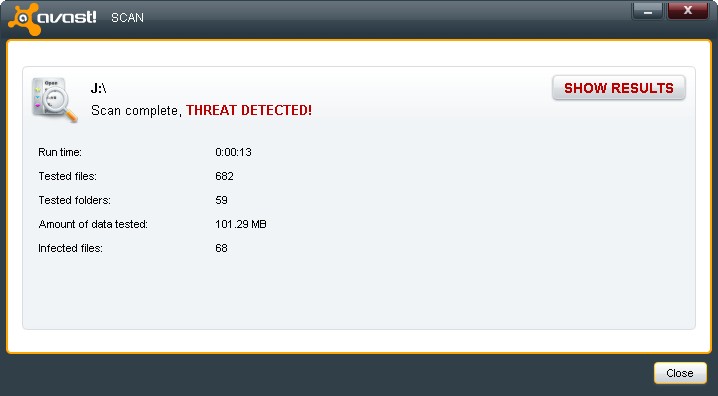
A scan of the USB pen drive which infected my laptop

That was 4 years ago. My girlfriend is now my wife and we have a 9 month old son. Last week I was able to revive Rasini's dormant computer by fixing a new cooling fan and messing around with the cables. It still had the malware but I kept putting off installing any antivirus software on it for various reasons (mainly because I was lazy :)).
Yesterday while using my laptop, Chrome started giving me the "Aww.. snap" message. One of the things mentioned in the official google solutions page was to check if the antivirus software was messing with it so I paused my Kaspersky virus guard. After not being able to fix the Chrome issue, I ended up reinstalling it. But I forgot to restart the antivirus protection. While I was out, my wife had plugged in a pen which was used with the old computer in to my laptop to get the installation of Foxit reader. When I got back, things were looking a bit weird. My internet connection was showing a lot of uploads so I tried bringing down some processes and restarting. After the restart, explorer didn't show up (which is a typical symptom of Malware-gen infection) so I ended up restarting the process. The worst part was that I couldn't start Kaspersky. I knew then that I had gotten infected.
I was able to detect and delete most of the infected files by installing Avast Anti-virus and running a full system scan and a boot time scan. But I still get warnings of infected files once in a while so I guess it'll be some time before I'm completely rid of the nasty little fellow...
The results from my boot-time scan

A scan of the USB pen drive which infected my laptop
Sunday, July 06, 2008
IE Antivirus : A pain in the %^$#

IE antivirus is one of the most annoying malware I've ever come across in my life. It pops up warnings and opens pages in my browser when ever I double click on a folder. I guess it's a kind of explorer hijacker but it's anybody's guess. After two antivirus programmes and countless scans which failed to do anything about this little devil I was getting really mad... Today I was finally able to get rid of it using a program called Malwarebytes' Anti-Malware. One scan and a re-start was enough to do the trick... Removal procedure
Subscribe to:
Posts (Atom)


 Posts
Posts



