{C++ etc.}

Latest Posts
 
Home | C++ Posts | Linux Posts | Programming Posts | Issue Tracking Posts

Sunday, July 29, 2012

CleaCase on Windows 7 - Resolving slow checkin/checkout times

If you're using a ClearCase version between 7.1.1.1 and 7.1.1.5, you might have experienced extremely slow speeds when checking out files. Personally, I noted that this ran to ~7s per file when downloading an image via a custom script. I'm running CC 7.1.1.3 on Windows 7 Professional (64 bit).

Initially I blamed this on our corporate network but, since this wasn't occurring in Windows XP machines running the same script, I had to conclude that the issue was with the CC client. I came across this post in the IBM support portal and decided to give it a go (although this wasn't for the exact problem that I had).

I put the following in a .reg file:

Windows Registry Editor Version 5.00


[HKEY_LOCAL_MACHINE\SYSTEM\CurrentControlSet\services\Mvfs\Parameters]
"MiniFilterMask"=dword:0000020d


double clicked it to merge the entry and restarted my laptop.

Then when I ran my (previously excruciatingly slow!!) script, everything worked fine. I was getting the same speeds as on Windows XP. The purpose of the reg value is to make Mvfs service work in the same way as it would under XP.

Just to emphasize, this is not an officially announced fix and it might not solve everyone's problems. But if you're stuck with having to wait two days to get a checkout of the latest build images, it might be worth giving a try.

Tuesday, September 06, 2011

Burning Bootloader of an Arduino Uno with Another Arduino Uno

If you but a new ATMEGA 328P chip and plan to use it as a stand alone Arduino (with the proper wiring), you'll have to burn a boot loader on to it. This is easy if you have two Arduino boards. I'll outline how to achieve this using two Arduino Uno boards, since that's what I had at hand. I tried to get the boot loader on to the chip using an AVR JTAGICE MK2 but it didn't go well. This process is a bit of a hassle to set up but the actual burning process is very easy.

The main instructions for this are given here. Just follow them to the point and you could get a new bootloader on to your Uno in several minutes.

The only thing that I did differently to the above article, was to use the arduino IDE instead of using AVRDude. I'l give the steps for the complete process below:

1. Connect your two Arduinos according to the above schematic


2. Open the Arduino IDE. Select the correct COM port and set the board to Arduino Uno

3. Load the Arduino ISP sketch on to the programmer board. This sketch is located at [Arduino istallation folder]->Examples->ArduinoISP

4. In the IDE, select Tools->Burn Bootloader->w/ Arduino as ISP

This will begin the burning process. It'll take about a minute for writing to finish. After that, you could disconnect the two boards and use the newly programmed board as a stanalone Arduino Uno

Thursday, June 09, 2011

HC-SR04 Rangefinder (with Arduino)

Setup:
Connect digital pin 13 to Trigger.
Connect digital pin 12 to Echo.
5V of Arduino to Vcc.
Ground of Arduino to Gnd of SR04

Note: The 5V out from Arduino might not be enough for the range finder to work. If it's not giving proper values, try giving power from an external source (like 4 AA batteries).

Code: (This consists of a sample that I got off the net. I don't remember the exact page but I want to give credit to the original creator)


int pingPin = 13;
int inPin = 12;

long duration, inches, cm;
 
void setup() {
  //pinMode(13, OUTPUT);
  pinMode(pingPin, OUTPUT);
  pinMode(inPin, INPUT);
  Serial.begin(9600);
}
 
void loop()
{
  // The PING))) is triggered by a HIGH pulse of 2 or more microseconds.
  // Give a short LOW pulse beforehand to ensure a clean HIGH pulse:
  //pinMode(pingPin, OUTPUT);
  digitalWrite(pingPin, LOW);
  delayMicroseconds(2);
  digitalWrite(pingPin, HIGH);
  delayMicroseconds(10);
  digitalWrite(pingPin, LOW);
  //delayMicroseconds(2);
 
  // a HIGH
  // pulse whose duration is the time (in microseconds) from the sending
  // of the ping to the reception of its echo off of an object.
 
  duration = pulseIn(inPin, HIGH);
 
  // convert the time into a distance
  inches = microsecondsToInches(duration);
  cm = microsecondsToCentimeters(duration);
 
  Serial.print("Distance: [");
  Serial.print(inches);
  Serial.print("]inches. [");
  Serial.print(cm);
  Serial.print("]cm\n");
  delay(1000);
}
 
long microsecondsToInches(long microseconds)
{
  // According to Parallax's datasheet for the PING))), there are
  // 73.746 microseconds per inch (i.e. sound travels at 1130 feet per
  // second).  This gives the distance travelled by the ping, outbound
  // and return, so we divide by 2 to get the distance of the obstacle.
  return microseconds / 74 / 2;
}
 
long microsecondsToCentimeters(long microseconds)
{
  // The speed of sound is 340 m/s or 29 microseconds per centimeter.
  // The ping travels out and back, so to find the distance of the
  // object we take half of the distance travelled.
  return microseconds / 29 / 2;
}


Monday, January 31, 2011

How to extract the contents of HXF files

The .HXF extension is used in a variety of applications. The one that's being referred to in this case are the HXF files which come bundled with firmware upgrades for some Chinese PMPs.

I bought an Onda VX575 FHD (Full HD) recently and wanted to customize some of the images and text which come with the original firmware. This is reletively easy to do. You only have to extract the contents of the HXF file, make the changes to the files that you want, repack it and burn it to the device. There's a great tool which has been written to unpack and repack HXF files. It's called HXF extract (what else :)) and could be downloaded here.

Once it's downloaded, all you have to do is run it, click the "Unpack HXF" button and point it to the HXF file. It's extract it's contents to a folder named "out_hxf". Make changes to the files in the out_hxf folder, run the tool, select "Repack HXF" and select a file name for the new file and you're done.
Sometimes you might encounter an error (can't remember the exact message) which would most likely be due to a missing COMDLG32.OCX file. Download it from a valid site (you could find it via google search) and type:

regsvr32  \comdlg32.ocx

at a command prompt to register it. The tool should work fine after that.


Resources:
http://www.mp4nation.net/forum/viewtopic.php?f=63&t=13184
http://dingoo-digital.com

Thursday, December 30, 2010

Finding the Right Domain Name for your New Website

Coming up with a short, catchy and relevant domain name can be a difficult task. Specially because most of the top domain names have already been registered by someone else. It's always good to know the setting and context of the website before you purchase a domain in order to make this process a lot easier.

The Newbie Toolkit: How To Register And Host Your First Domain 

The ideal domain name should be:
  1. Short
  2. Relevant
  3. Memorable

It's best to avoid:
  • Under scores and dashes
  • Numbers (when not relevant to the subject)
  • Alternate (but incorrect) spellings

Then we need to go to a domain look up service such as http://www.checkdomain.com/ to see whether the domain that we want is available. Be ready for disappointment because most of the time you will find that the particular domain is unavailable. Check to see whether pre or post fixing words like "hot", "best", "all", "the", "top" and "get" would work. If not, you will have to move on to the next phase.

This is when your domain knowledge comes in to play. Try to pair words which are relevant to the site's content to come up with a catch name. This might not directly reflect the subject matter but should be easy to relate to it.
eg.
  • rottentomatoes.com
  • stackoverflow.com
  • gsmarena.com

Keep at it till you find something that you really like. Do not get discouraged and get yourself a domain like "the-best-music-online-10.com". It's a hard and time consuming process but it's better to be patient and register the right domain name than end up with something that you will realize to be unusable after a few hours.

I have purchased several domains in the past and some of them proved to be fruitless and a waste of time and money (such as amazon40.com). But the one's that I purchased after doing my research and trying patiently, have been very successful (e.g. steamsigs.com, theduffel.com). So be patient and keep trying. You will not regret the extra effort.


Case Study:

As a small exercise, I decided to try coming up with a good name for an arbitrary web site, just to see the effectiveness of the given guidelines. The subject I selected is (I'm thinking of one right now ;)) menswear. It could be a site which sells menswear or reviews them. Doesn't really matter.
The obvious key word would be menswear. Let's come up with some domain names to check (I'm only considering .com for now because its the one used the most):
menswear.com
topmenswear.com
hotmenswear.com
allmenswear.com
bestmenswear.com
totalmenswear.com

All are registered. Let's come up with a list of relevant terms:
man, clothes, garb,look,smart,free,handsome(too long), charmer,hunky, perfect, fit, apparel, attire

First find, hunkgarb.com. Short and catchy but let's keep on looking for something a bit more formal.
Second find, hunkattire.com.. hmm...
Third time's the charm!! manattire.com is still available. It's catchy with a bit of sophistication. Should be perfect.

I haven't given details of the last phase of the process but it's pretty straight forward. Come up with keywords and look for synonyms. This is very important. You'd most probably find a word that's more befitting to your purpose. This is how I ended up with the word "attire"... by looking for a synonym for "clothes".

So this concludes the case study. Most probably the domain "manattire.com" would not be available in a few months but I think it served to detail the process involved in coming up with the perfect domain name.

Good resources:

Website Design and Development: 100 Questions to Ask Before Building a Website Creating a Web Site: The Missing ManualWeb Design and Marketing Solutions for Business WebsitesBuild Your Own Web Site The Right Way Using HTML & CSS, 2nd EditionBuild a Website for Free (2nd Edition)

Tuesday, December 07, 2010

Increase the number of your Facebook fans within hours

I've recently created a page for my website on Facebook (this one) but hasn't had any luck increasing the number of followers apart from my friends. I signed up for Twiends and it instantly increased the number of my fans. It's only been about 5 minutes and I've already got 5 followers.
The system works pretty well. You "like" other people's pages to earn credits and redeem them by getting people to "like" your website. You could buy credits if you want to get more exposure. I'm optimistic about the results and think this would prove to be a great service.

Edit: One catch though.Someone could (possibly?) like your Facebook page, earn the credits and then Unlike it. Should rarely happen but there is a chance.

Monday, November 29, 2010

Starting and Running Your Own Website on the Cheap

One of the main obstacles to launching your own website is cost. The initial cost of starting a website could be given as the sum of:

  • The domain name
  • Hosting charges
  • Charges for designing the website
  • Advertising cost
For something that you launch out of your own interest, we could eliminate the advertising cost. Let's look at each of the other factors to find out the minimum required capital.

1. Purchasing a domain name
You could easily get your free .co.cc domain name from http://www.co.cc.
But for if you have long term plans for the site, and if the site is something you could profit from, it's always better to get a .com domain (or .net or .org according to your purpose). Your website would get better exposure and recognition this way. The cheapest registration service that I've found so far is http://www.domainsarefree.com, which offers .com,.net and .org registrations for $3.99. There are cheaper services which have a lower price point ($1.99) but it's always better to go with a reliable service which you trust since you would have to renew the registration annually.

2. Hosting charges
This is one of the most important steps in launching a website. Selecting a good host is critical to ensure the performance and up-time of the website. So it'll be bit of a juggle in the cost-benefit department. You need to get a cheap host, but also someone that offers a reliable service. I settled on HostGator since it had a good track record and was a recognized and trusted service. So far their service has been extremely good. My site's never gone down. There's extremely good support for PHP, and mysql via the control panel. They also provide a free site builder with pre-designed templates. They have three plans:

  • Hatchling - $4.95, Single Domain, UNLIMITED Disk Space, UNLIMITED Bandwidth, Shared SSL Certificate
  • Baby - $7.95,UNLIMITED Domains, UNLIMITED Disk Space, UNLIMITED Bandwidth. Shared SSL Certificate
  • Business - $12.95, UNLIMITED Domains,UNLIMITED Disk Space,UNLIMITED Bandwidth, FREE Dedicated SSL & IP, FREE Toll-Free Number
*The above are new prices. Previously the hatching plan was $7.95. Price might change in future.

The hatching plan is a good starting point for a new website.


3. Designing the website
The cheapest way to design your website is to do it yourself. If you are tech savvy, you could write on from scratch. If not, you could use pre-built free website templates available online (or use website building tools provided by the host). But the easiest method by far, is to create Wordpress blog. Some think that Wordpress could only be used for blogging. This was my impression at first. But after using it for a while, I realized that you could customize a wordpress blog to suit almost any requirement. You could add content to the site as blog posts, post them as a stream or sticky on the home page, customize the theme to suit the context and install plugins to boost productivity. You have to learn a few tricks to make it behave the way you want but it'll come after you play around with the files for a while. This would be the best option for a website for which you will be adding content continuously and want to minimize the hazzle of maintenance.

4. Advertising your site
In order to get the full benefit from your site, you have to make people aware of it. Assuming you don't want to spend any money on it (as is the case with most personal websites) you could start link building and adding the site to social networks. Post on relevant forums and make sure you're not breaking the rules by providing a link to the site. Create tome directory listings. These and more steps are explained thoroughly on several blogs and sites so I'll skip this step.

Final total(first month): $3.99+4.95 = $8.94
Monthly cost:$4.95

It's always best to go with a better vendor if you could spare a bit more cash. I did my domain registration also with hostgator and the total cost for me was:
Final total(first month): $22.16 + $7.95 = $30.11
Monthly cost:$7.95

That's it. Now all it takes is a bit of your time, some link love and SEO and you'll be on your way!

Visit my site to see what I ended up with ;)

Best Wordpress Theme for Item Display with Images

I've been looking for a theme suitable for a store front which would give the following features:
  • Display Item with images
  • Small squarish area for each item, arranged in a grid
  • Minimalistic
  • No Sidebar (or easy to remove)

I tried a lot of the suggested themes under this topic and none of them seemed to suit me.
I finally settled on Kubrick On Crack. You can see the demo site here.


It wasn't prefect for the job since it only displayed excerpts from posts in the home page if they didn't have a tagged thumbnail image. And the featured post area was a bit of a nuisance because a post (item) had to be specially customized for it. I ended up modifying the index.php and style.css files and was able to come up with something which suited my taste (screen shot below).


It's not perfect yet since some of the item listings overflow the allocated area. I'll be tweaking this continuously and hopefully I'd be able to put up a post on how to do it.


Wednesday, August 11, 2010

Platform Builder error - "The entered path is not a valid build tree path"

I've been struggling with this for the past few hours till I found a post on the Windows CE base team blog which explains the causes for this error and possible solutions.

http://blogs.msdn.com/b/ce_base/archive/2005/09/15/467609.aspx

The method that I used to solve this is to use a custom build tree used in my company. Reinstalling Platform Builder without using the "Tools only" options might also fix this error.


Apparently you cannot use the WM500 image in Platform Builder 5.

A bit more information I just learned today. Technically speaking Windows Mobile 5.0 is a "tools only" Platform Builder install with the Windows Mobile command line build system. So a full install of WM still counts as "tools only." I guess that means you cannot build a WM image from inside Platform Builder, and must instead use the command line. (?) 

So one would have to use a valid build tree or use the command line.

Friday, July 09, 2010

My new website: SteamSigs.com

I Created a new site to generate dynamic forum signature images showing near-real time stats from SteamCommunity.com, of community members. The stats are near real-time because there's a lag of about 10 minutes. This is the cache period for the stats and status data.
SteamSigs.com

Sunday, June 13, 2010

An Unbiased Review of VIAddress.com

VIAddress is a company which provides U.S. addresses to non-U.S. based individuals (like myself). They also provide package consolidation and forwarding services. What this basically means is that you could shop from sites which only ship within the U.S., and ship several items at once to your home country.


When I first visited their site, I was enticed by the good design and the stat tables which showed VIAddress's advantages over other similar services. I read several reviews and they all had high praise for the service. So I signed up for the service without hesitation (this is free) and bought several items from Amazon.com to be shipped to my new U.S. address.


It was only a few days later that I came across several reviews which listed VIAddress.com as a scam. I was a bit scared since I had already shipped two items their. Their were several complaints claiming that VIAddress employed people to write good reviews about them. It's a bit unethical but not that bad. So I waited to see what would happen to my packages.


My packages arrived at the warehouse in East Lexington Avenue, and after about 5 hours, they appeared on my VIAddress.com account page. The update process takes some time but it seems to be reducing (maybe they've hired more people??). One of the things to take note is that they take a very long time to answer e-mails. Sometimes weeks. 


The VIAddress warehouse as seen by Google maps


I've shipped two items there. Two more are on their way. I've used their concierge service. I've cancelled the concierge order and received a refund about 4 days later. The concierge order table does not get updated and their's no way to cancel the orders once they are placed (except by mailing them). Event after the orders are manually cancelled, there is no way to remove them from your personal page. So I would stay away from the concierge orders for now.


The Shipping Manager page which lists items in suite and pending items


Their shipping charges are reasonable. Only FedEx option is given when you try to ship something, although the FAQ mentions DHL and UPS. The charges are about $60 for a package which has a dimensional weight of 13 lbs. $100 for 25 lbs. (dimensional weight), which is a bit high but lower than MyUS.com.


All in all I'm pretty happy with the site's service so far. I hope they would provide more communication channels to customers (live chat is never on) to get real-time support on issues. Other than that, it's pretty good.


(I'll update this post with details about shipping procedure once my items are shipped out).

Wednesday, May 19, 2010

Best Music Player for Ubuntu Lucid Lynx

Exaile
Loved:
  • Music management
  • Internet radio
  • Amazing sound quality
  • Cover manager
  • Stability when managing large music collections
  • Sleek styling
  • Loads of plug-ins 
 

Other players installed and tested:
Amarok - Appalling music management. Doesn't show cover art
Banshee - Crashes after installing all plugins
gmusicbrowser - Interface too simple. No looks
Guayadeque - Looks are not polished. User experience is not as good as Exaile
Songbird - Didn't test. Didn't like it in Windows

Virus Scan stuck at 1% for 5 Hrs

5 hours and 3.9 partitions later, Kaspersly still says it's completed only 1% of it's scan.. Hmmm... Shady...

Tuesday, May 18, 2010

Social Networking Application "Gwibber" on Ubuntu Lucid Lynx


I Like!!!

Running Ubuntu in Full Screen mode in Windows XP with Virtual Box

After installing an Ubuntu guest in Windows XP, you might not be able to switch to high resolutions as they are not listed. Only 800x600 will be available.
You need to install the Linux guest additions to enable higher resolutions.
Press the Host key (Right Ctrl) + D.
This might not do anything. In that case you'll have to install the guest additions manually. Note that the Virtual box guest additions image is already mounted. If you go to "Devices->CD/DVD drives" you'd see a listing called "VBoxGuestAdditions.iso". This is the image containing the all guest additions.
Start your Ubuntu virtual machine. Open the "VBOXADDITONS_XXXX" drive and check the contents. This would also mount the drive if it isn't already mounted. Fire up a terminal. Go to the drive. Run "VBoxLinuxAdditions.run".
Restart the machine. You should now be able to switch resolution to high values.


Sunday, April 18, 2010

QtCreator is great...

 but it still has a long way to go in terms of improving usability. The build times are 3 to 4 times that of NetBeans. The debug functionality gets disabled sometimes for no reason. And you can't select multiple files in the project window.
All these things make the experience of using QtCreator a bit mediocre. If these minor issues are addressed, this would be one of the best IDE's for C++ development.

Strange AdSense Banner


I blog about a lot of topics but I just can't figure out why Google thought an ad for abattoir machinery would fit in with the content, specially on a page with a post about babies :D


Friday, April 16, 2010

Gorillaz's Plastic Beach is great for putting babies to sleep

I'm in the habit of playing some music when ever I have to put my son (whose 9 months old)  to sleep, mainly because it cancels out most of the background noises which would otherwise catch the little guy's attention.
I try to keep track of the number of songs it takes till he goes in to a deep sleep which serves as a metric which could be used to select which one to play on different occasions.
In this regard, Plastic Beach works exceptionally well. I play it with no shuffle and my son falls asleep by about the third song (White Flag Ft. Kano, Bashy & The Lebanese National Orchestra for Oriental Arabic Music.. I love this track).
Other albums I've tried out, according to each ones sleep power :) :

1. Sade - Soldier of Love
2. 500 Days Of Summer (OST)
3. Green Day - 21st Century Breakdown
3. Bee Gees - Their Greatest Hits- The Record Disc 1
3. Timbaland - Presents Shock Value 2
3. Chris Brown - Graffiti
4. Katharine Mcphee - Unbroken
5. One Republic - Waking Up

"Soldier of Love" is the album to put babies to sleep. I usually play it when he's sleeping to help him relax and cancel external noises (like me bashing on the keyboard), and it works great.

Sunday, April 11, 2010

Apple Branding vs. Micorosoft Branding

I recently read two articles, one which detailed apple's branding strategy and how it has been able to build it's image and develop an almost cult like following, and the other which focused on Microsoft not being able to maintain it's brand image after the realease of Windows Vista.


 I started wondering about how Apple has been able to create an emotional bond with most of it's customer base after the extremely successful launch of the iPad. The detailed breakdown of the hardware shows that it's nothing but a faster iPhone with a larger screen. But a lot of people have praised it as being the "next big thing in portable computing". How's it that Apple's able to push out prodducts with minor changes and generate so much enthusiasm amongst the public?

As article 1 above mentions;

"It's like having a good friend. That's what's interesting about this brand. Somewhere they have created this really humanistic, beyond-business relationship with users and created a cult-like relationship with their brand. It's a big tribe, everyone is one of them. You're part of the brand."

Saturday, April 10, 2010

Infected by Malware-gen... again

I've had my fair share of encounters with this annoying virus. It first infected my computer at the University, spread to my home computer and later to that of my girl friend's. I got rid of the first two after a lot of work, but by that time Rasini's computer had some RAM issues and wasn't being used.
That was 4 years ago. My girlfriend is now my wife and we have a 9 month old son. Last week I was able to revive Rasini's dormant computer by fixing a new cooling fan and messing around with the cables. It still had the malware but I kept putting off installing any antivirus software on it for various reasons (mainly because I was lazy :)).
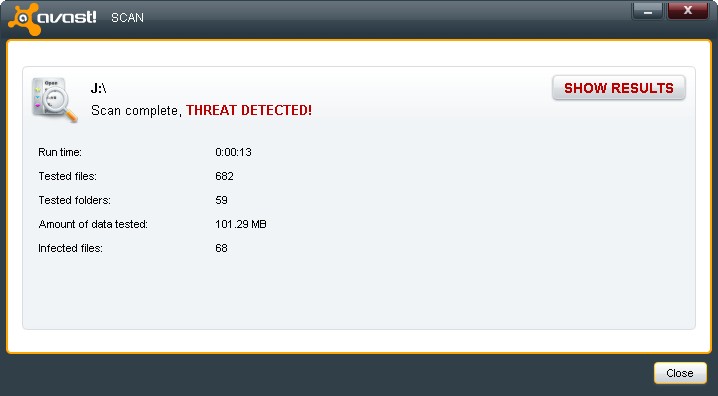
Yesterday while using my laptop, Chrome started giving me the "Aww.. snap" message. One of the things mentioned in the official google solutions page  was to check if the antivirus software was messing with it so I paused my  Kaspersky virus guard. After not being able to fix the Chrome issue, I ended up reinstalling it. But I forgot to restart the antivirus protection. While I was out, my wife had plugged in a pen which was used with the old computer in to my laptop to get the installation of Foxit reader. When I got back, things were looking a bit weird. My internet connection was showing a lot of uploads so I tried bringing down some processes and restarting. After the restart, explorer didn't show up (which is a typical symptom of Malware-gen infection) so I ended up restarting the process. The worst part was that I couldn't start Kaspersky. I knew then that I had gotten infected.
I was able to detect and delete most of the infected files by installing Avast Anti-virus and running a full system scan and a boot time scan. But I still get warnings of infected files once in a while so I guess it'll be some time before I'm completely rid of the nasty little fellow...

The results from my boot-time scan


A scan of the USB pen drive which infected my laptop